Do you think that these are the best solutions for your problem?

Pages

How do you make voice calls using the Facetime application on iOS 7 system ?


Now with the iOS 7 you can make voice calls using only the Facetime application, which saves you may be able to download any other application to make voice calls free of charge using the Wi-Fi.


How easy, if you're freelancing a friend, by clicking on the Contact will show you three icons, the first to do a video call using the Facetime and other "mark the speaker" to make a voice call, and when you click on them you can choose between the work of a voice call normal (calltelephone) or make a voice call via the Facetime.


You can also make a voice call using the Facetime by applying the Facetime directly or via the Contacts app and display the Contact card and click on "sign headset" and choose the work voice call Bashaddam the Facetime.

How to prevent an entry from your contact or correspond ?


If you get many calls unwanted or get many of the ads in the messages, you can now prevent any of the numbers from your contact or send any messages to you without the use of any application or even pay extra fees, but you should be using the systemiOS 7, at least where that this property is within the characteristics of the new system.

The first way: 


To prevent the number registered to have contact with you again via the Settings and then choose any of the Phone or Messages, and then choose Blocked and then you can add any of the numbers you have previously registered to the list of figures prohibited from contacting you.

The second way: 


This method can be used to prevent a number from your contact without being registered you already have and more easily by applying the Phone, and then choosers recent calls and choose the number you want to prevent him from contacting you then choose the "i" and then select Block thisCaller.

The third way:

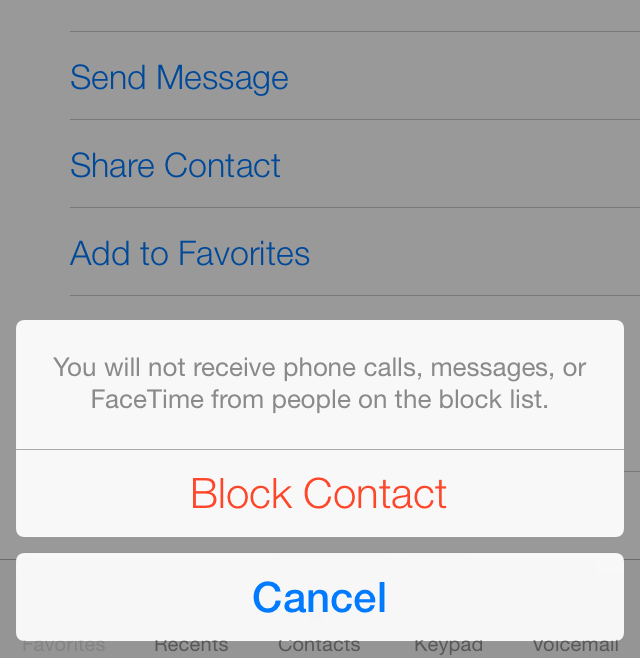
This method is through the application of the Messages and suitable for the disposal of messages ads, after that choose the message you want to prevent Russelha of mailing again click on Contact, and then the "i" and then Block this Caller and emphasized again by clicking on the Block Contact.

Apple adds new evidence for the use of the iPhone 4S , 5C and 5S


Apple has added a new section on your iPhone with the 5C phones, 4s and 5s, and contains a new section on the guide "Tips & Tricks" helps the user to learn more about the new and the phone in the system iOS 7.


And get all of the three mobile phone on its own page give you information on how to use the camera application, maps and the Facetime application and other applications and tools on the phone. These pages are a quick guide and miniature Guide Apple iPhone and the iOS system 7

And the strange thing is that the iPhone 5 phone did not get this new section unlike the 5S, 5C and even the 4S. Probably due to shut down its production of Apple?...

RealNetworks company offering application RealPlayer Cloud


RealNetworks announced internationally known RealPlayer application for a new application and is RealPlayer Cloud and rendered integrates application running properties Videos with the Cloud service.


And the application comes the characteristics of multi-including the ability to run videos and filed on the Cloud to become available to the rest of your devices, and also the possibility of adding Videos from the other device on the Cloud to become available on your phone, you can also application to download Videos from on the Cloud for your phone to become available to view without the need for aInternet service.


And supports application RealPlayer Cloud all the most commonly used formats such as FLV. And MP4. And MOV . And others, as you can the application of share Fedohatk securely with friends and relatives , it choose to share video with them, they are only able to see and untouched by e -mail without having to provide their application .

And provides you with the application of RealPlayer Cloud 2 GB of space when you set up an account on the service to raise them Fedohatk , of the application is also available on the Android system version and copy Desktop .

You can learn more about the application RealPlayer Cloud and service provided that watching this video provided by RealNetworks.

Application requires version iOS5 at least supports iPhone, iPad and iPod Touch, the application and the service is currently available only in the United States , you can register on the RealPlayer Cloud to know when the application is available in your area , or you can register for the service and get your application 


Apple announces sale of more than 9 million iPhone and more than 200 million activated for iOS7


Apple announced through its official report startling figures on the sales of the new iPhone and its latest version of the iOS system .
In regards to two iPhone new iPhone 5S and iPhone 5C surpassed the sales of the 9 million units in the record within 3 days only since the beginning of sale device , despite limited sales Only 9 countries which suffered during wishing to purchase hardware from a lack of availability , especially golden color of the iPhone 5S , which has led , as we released you in a previous blog post Apple asked its suppliers to increase production !

On the other hand, and as you also deployed in a previous blog post , Apple announced that there are more than 200 million device they update the latest version of its iOS7. A record number is expected to hold for quite some time by the updated hardware at the very least , which exceeded 50 % in less than 5 days. The reason for this is that the system has been redesigned and add many wonderful characteristics and features that made everyone eager to get it since the first hours of its launch . I say that the figure will hold for quite some time because Apple is the only one of its competitors that allow the update immediately to a large number of its various Modellatha the bodies has the support iOS7 10 different devices between the iPhone , iPad and iPod touch . The other reason that it will not be easy for Apple in its next make a big difference and unique as it is happening now .

You can read the full report from the official Apple site here "First Weekend iPhone Sales Top Nine Million, Sets New Record"

Apple Maps team asks designers and Web interfaces in the "secret project"


Apple published a list of new functions today , asking designers and Web interfaces maps can design and develop and write high - definition BB complex for a secret project .
Place is located in the Santa Clara Valley , California According to the list , this small part of the team working on advanced Web environment will be the nucleus for a lot of upcoming Apple products .

But from the information given does not seem to matter " very secret " where it appears that Apple is planning to launch a Web version of its maps like Google Maps .

7 great advantages "hidden" in iOS 7


Has a new update launched by Apple on the mobile operating system for iPhone, and named iOS7 many of the features that provide ease in handling, but some are hidden from most users need a lot of time to explore.

The new operating system allows users to close applications faster, and to the following pattern of the phone to read maps, as well as other great advantages are as follows some of them:

1 - The time code:

If you focus a little you will see that the new system has the actual hour clock with the hours, minutes and seconds for people who do not like a lot to deal with digital clocks.

2 - maps text messages:

Text messages can be moved towards the left for all text messages, not just talk them.

3 - Measuring Level:

Can by opening the application of the compass, and agitated for access to another application measures the level of different surfaces.

4 - Style Night Maps:

When you use the phone in the dark to review the maps, the new system provides the following pattern facilitates clear vision and comfortable for the eyes.

5 - the closure of several applications:

Suite of applications can be closed at the same time, and double clicking on the Home button to show open applications, then pull the three applications by the fingers up.

6 - Call Blocking:

Of useful features in the new system the possibility of blocking annoying calls, and so by going to the settings, phone, and then to the block to add numbers to be blocked.

7 - the most commonly used applications:

Apple applications store contains new recognition feature on the most popular applications in the region or the country in which they live person.